CygNet Dispatch
 CygNet Dispatch is a separately available CygNet product provided so that you can integrate job scheduling and tracking information from tasks performed in the field, such as calibration and inspection results, with data in your CygNet Measurement software instance.
CygNet Dispatch requires the installation of CygNet Bridge software, and must be selected as an option during the CygNet Bridge installation process. CygNet Bridge maintains secure data access, allowing you to access your required CygNet data without direct access to a CygNet system.
|
CygNet Dispatch |
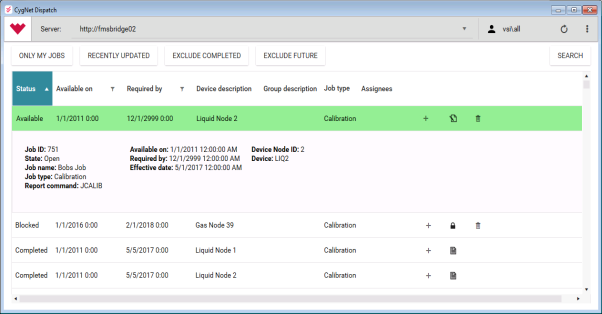
CygNet Dispatch provides job scheduling, tracking, and reporting features to add to your measurement data tool set, so that you can incorporate results from field technician activities or "jobs" that potentially affect the gas meter data present in CygNet Measurement, specifically static pressure (SP), differential pressure (DP), and temperature values, which can result in adjustments to previously calculated volumes.
See CygNet Measurement in the CygNet Help for more information about CygNet Measurement functionality.
CygNet Dispatch License
CygNet Dispatch is licensed in conjunction with CygNet Bridge, and must be licensed separately from existing CygNet SCADA or CygNet Measurement components.
Note: When you install an updated CygNet license file, recycle CygNet Bridge in the IIS Application Pools list using the IIS Manager to refresh your web application and pick up new functionality. Refer to Microsoft IIS (Internet Information Services) documentation if you need more information about that process.
For more information about obtaining and licensing the CygNet Dispatch and CygNet Bridge products, contact your Account Manager
Install CygNet Dispatch
CygNet Dispatch requires the installation of CygNet Bridge software, and must be selected as an option during the CygNet Bridge installation process.
Installation includes the following steps.
- Prepare your system
See Preparing Your System for CygNet Dispatch for more information.
- Install CygNet Bridge
See Installing CygNet Bridge for more information.
- Install CygNet Dispatch
See Installing and Updating CygNet Dispatch for more information.
Use CygNet Dispatch
Run CygNet Dispatch in conjunction with CygNet Measurement v9.0 or greater. See the CygNet Release Documents for more information about current software version requirements and considerations appropriate for your installation and usage.
Note: It is highly recommended to use a more recent version of CygNet Software as your baseline; v9.6 is already in limited support and has been superseded by more recent versions containing additional functionality.
CygNet Dispatch is accessible on various levels, depending on your permissions for the application and your access to CygNet Measurement. See FMS Security in the CygNet Help for more information about setting up permissions.
CygNet Dispatch users with valid login credentials, and basic level permissions, have access to all of the non-administrative functions available in CygNet Dispatch. This allows the field technician to view, filter, open and enter data for various job reports. For each job report selected and opened, the technician can populate the report with field data, save in-progress work, complete the work for a job or (if listed as an assignee) flag a job as blocked if necessary.
CygNet Dispatch users with valid login credentials, and higher level permissions, also have access to CygNet Dispatch administrative functions, which will appear in the administrative task menu accessible via the ... button on the user interface. These tasks allow the administrator (such as a foreman) to also manage the users present on the assignee list, make group assignments, import or export job files to/from the server, and create new jobs manually on an ad hoc basis.
CygNet Measurement users who have appropriate security permissions can perform more functions related to measurement system data, such as setting up Nodes and group relationships in FMS Explorer to identify what will appear in CygNet Dispatch, assigning security permissions to various users, and making decisions about implementing data recalculations.
Once configured for the various user levels, you can use CygNet Dispatch to assign groups of devices to specified field technicians responsible for performing tracking and reporting tasks on a variety of scheduled jobs (for example, calibration and inspection). CygNet Dispatch job results can then be integrated with CygNet Measurement for data calculation and reporting purposes. See Reports: Job and Reports: Late Job in the CygNet Help for more information about the FMS commands to run job reports to publish the information.
Important: If jobs disappear from CygNet Dispatch, it may be that the associated Node no longer exists in the system for the specified time. The actions of either deleting a Node (from a point in time) or purging a Node (and its records) from CygNet Measurement also permanently and completely removes all associated CygNet Dispatch job information from the system. See
Access CygNet Dispatch User Assistance
CygNet Dispatch endeavors to provide usability prompts within the feature set itself, thereby not requiring an extensive dedicated Help file.
Portions of the CygNet Measurement section of the CygNet Help pertain to CygNet Dispatch and to accessing information regarding calibration and inspection job reports. Other portions of the CygNet Help also pertain to preparation and installation of CygNet Dispatch. The following related topics may prove helpful:
- Jobs control
- Using the Jobs Control — FMS Explorer control
- CygNet FMS Jobs Control — ActiveX control
- CxFmsJobsCtrl Object — Scripting control object
- FMS commands (operate in conjunction with CygNet Dispatch)
See the CygNet Bridge Installation Guide, which provides the same content as is available in the main CygNet Help in PDF format.
To address questions or circumstances beyond the scope of the CygNet Help, Additional CygNet Resources are available.
More:
 Preparing Your System for CygNet Dispatch


